The Best Streaming Devices (2026)
Roku, Fire TV, Google TV or Apple TV? We compared nine streaming sticks and boxes on picture formats, remotes, ecosystem fit and reliability.
We independently research every product. When you buy through our links, we may earn a commission. Learn more
The Verdict

Roku Streaming Stick Plus
Simple, neutral and cheap. 4K HDR streaming with a voice remote that also runs your TV's power and volume.
Check price on Amazon
Amazon Fire TV Stick 4K Plus
Dolby Vision, HDR10+ and Atmos on a cheap stick, plus Wi-Fi 6, Alexa+ voice search and Xbox cloud gaming.
Check price on Amazon
Apple TV 4K (4th generation)
The fastest, slickest box here, with a Siri Remote you can track with Find My and deep ties to iPhone and HomePod.
Check price on Amazon
Google TV Streamer 4K
Google TV's personalized home screen, lots of storage, an Ethernet port and smart-home controls on your TV.
Check price on Amazon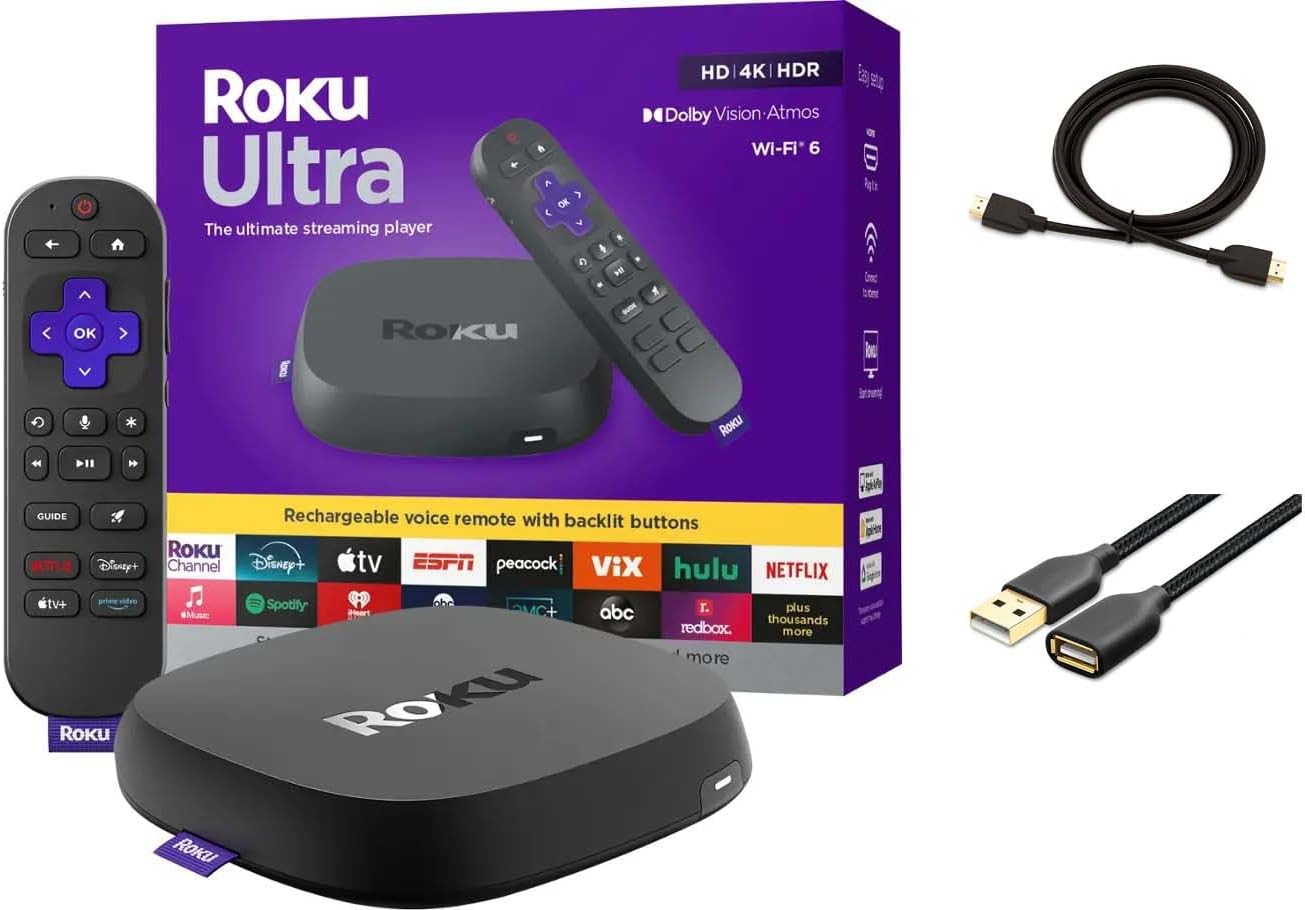
Roku Ultra
Roku's fastest player, with Dolby Vision and Atmos, Wi-Fi 6, and a rechargeable backlit remote you can find when it's lost.
Check price on Amazon
Amazon Fire TV Stick 4K Select
The cheapest way to add 4K streaming and Alexa voice search to a TV.
Check price on AmazonWe did the homework
We compared 9 products, considered real owner experiences over months of use, and checked manufacturer specs and warranties. No brand paid to be included, and we update this guide when better options come out. Our research process
Who this is for
A streaming device is the cheapest way to make any TV feel new again. It gives you a fast, simple menu for every app you use, a remote with voice search, and support for modern picture formats your TV’s built-in software may lack.
The biggest decision isn’t really specs, it’s which ecosystem fits your home. Roku stays neutral. Fire TV ties into Alexa and Prime. Google TV suits Android and Google Home households. Apple TV is the natural choice for iPhone families.
How we picked
We compared the bestselling sticks and boxes from each major platform and weighed:
- Picture and sound formats: Dolby Vision, HDR10+ and Dolby Atmos support.
- Speed and reliability: what owners report about lag, freezing and devices failing early.
- The remote: voice search, TV controls, backlighting and lost-remote finders.
- Ecosystem fit: how well each works with the phones and smart speakers you already own.
- Value: whether pricier boxes deliver enough over a cheap stick.
Roku Streaming Stick Plus
Best for: Most people, especially anyone who wants something easy for the whole family or for an older TV.
Price range: $$$$
Check price on AmazonWhy it’s the pick
Roku's big advantage is neutrality: it doesn't push you toward Amazon, Google or Apple, and every major streaming app is there. The interface is famously simple, which is why owners frequently recommend it for older TVs and less techy relatives.
This stick does 4K with HDR10+, supports modern video formats including AV1, and can power itself from your TV's USB port, so there's no extra cord to hide. The voice remote handles TV power and volume too. It also works with Apple AirPlay and HomeKit, Alexa and Google Home, and comes with a one-year warranty.
Nitpicks
The listing doesn't mention Dolby Vision or Dolby Atmos, so home-theater fans should look at the Roku Ultra. Some owners report the remote occasionally not responding and the occasional Wi-Fi dropout.
The good stuff
- Simple, brand-neutral interface
- Powers from the TV's USB port
- Remote controls TV power and volume
- Works with AirPlay, Alexa and Google Home
The catch
- No Dolby Vision or Atmos listed
- Some reports of remote and Wi-Fi hiccups
Amazon Fire TV Stick 4K Plus
Best for: Prime members and anyone with Alexa speakers or smart-home gear.
Price range: $$$$
Check price on AmazonWhy it’s the pick
For a stick in the same price range as the Roku, the 4K Plus supports more premium formats: Dolby Vision, HDR10+ and Dolby Atmos. Wi-Fi 6 helps keep 4K streams smooth when lots of other devices share your network.
It runs the redesigned 2026 Fire TV interface with Alexa+ voice search, which you can use to find shows across apps or control smart-home devices. It also supports cloud gaming through Xbox Game Pass and Luna if you add a controller and subscription. Owners frequently call it easy to set up and good value.
Nitpicks
Fire TV's home screen leans heavily on Amazon's own content and recommendations. Some owners report remotes that wouldn't pair, and a minority say their stick stopped working early.
The good stuff
- Dolby Vision, HDR10+ and Atmos
- Wi-Fi 6
- Alexa+ voice search and smart-home control
- Xbox cloud gaming support
The catch
- Home screen pushes Amazon content
- Some remote pairing complaints
Apple TV 4K (4th generation)
Best for: iPhone households, home-theater fans and anyone who hates laggy menus.
Price range: $$$$
Check price on AmazonWhy it’s the pick
The newest Apple TV 4K runs on Apple's A19 chip, and owners consistently praise how fast it is: apps switch instantly without stalling. It supports Dolby Vision, HDR10+ and Dolby Atmos, and an Enhance Dialogue mode pulls voices forward so whispers are easier to hear.
If you're in Apple's world, it's a joy: the Siri Remote works with Find My, so you can make it play a sound or find it precisely with your iPhone. Built-in far-field microphones let you talk to Siri from across the room, and you can pair HomePod speakers for surround sound. FaceTime, Apple Fitness+, Arcade and Music are all built in.
Nitpicks
It costs several times more than a good stick, and several owners feel that's too much. Its best features depend on owning other Apple devices, so Android households get far less out of it.
The good stuff
- Very fast, lag-free interface
- Dolby Vision, HDR10+ and Atmos
- Siri Remote works with Find My
- Pairs with HomePods for surround sound
The catch
- Most expensive pick
- Best features need other Apple gear
Google TV Streamer 4K
Best for: Android phone owners, YouTube-heavy households and Google Home users.
Price range: $$$$
Check price on AmazonWhy it’s the pick
Google TV is the best at pulling shows from all your services into one personalized home screen, with watchlists that sync across your phone, TV and Google search. This box gives it plenty of room to run: 4GB of RAM and 32GB of storage, far more than typical sticks.
It supports 4K with Dolby Vision, passes Dolby Atmos to compatible speakers, and has an Ethernet port for rock-solid streaming. It also works as a smart-home hub for controlling devices from the TV. Owners praise its picture quality and say it's noticeably faster than cheaper alternatives, and simple enough for older family members.
Nitpicks
It's pricey for what most people need, and Google's listing says it requires an HDMI 2.1 cable sold separately. Some owners report remote issues and Wi-Fi disconnections.
The good stuff
- Excellent cross-service home screen
- 4GB RAM and 32GB storage
- Ethernet port
- Smart-home controls on the TV
The catch
- HDMI cable sold separately
- Pricey compared with sticks
Roku Ultra
Best for: Roku fans with a home theater, and anyone who constantly loses the remote.
Price range: $$$$
Check price on AmazonWhy it’s the pick
The Ultra keeps Roku's simple interface but adds everything the stick leaves out. Roku says it's 30% faster than any of its other players, and it supports Dolby Vision, HDR10+ and Dolby Atmos with Wi-Fi 6.
The headline feature is the Voice Remote Pro: it's rechargeable, its buttons light up in the dark, it supports hands-free "Hey Roku" voice control, and it has a lost-remote finder. The box includes an HDMI cable.
Nitpicks
Ironically, the remote draws mixed owner feedback, with some people unhappy with it. It also costs roughly three times as much as the Streaming Stick Plus, which is plenty for most TVs.
The good stuff
- Roku's fastest player
- Dolby Vision, HDR10+ and Atmos
- Rechargeable, backlit remote with finder
- Wi-Fi 6, HDMI cable included
The catch
- Mixed feedback on the remote
- Much pricier than the stick
Amazon Fire TV Stick 4K Select
Best for: A spare bedroom TV or anyone on a very tight budget.
Price range: $$$$
Check price on AmazonWhy it’s the pick
The 4K Select covers the basics for very little money: 4K with HDR10+, the new Fire TV interface, Alexa voice search and access to the big streaming apps, plus lots of free, ad-supported content.
Setup is quick, and owners often say it's easy to use.
Nitpicks
Owner feedback is the most mixed of our picks. A number of owners report that some apps they wanted weren't available on it, and others say it became glitchy within months. If you rely on a less common app, check that it's supported or step up to the 4K Plus.
The good stuff
- Lowest price
- 4K with HDR10+
- Alexa voice search
- Quick setup
The catch
- Some apps reportedly unavailable
- Mixed reliability reports
The spec sheet
| Spec | Best overall Roku Streaming Stick Plus | Best for Alexa and Prime homes Amazon Fire TV Stick 4K Plus | Best for Apple users Apple TV 4K (4th generation) | Best for Google and Android users Google TV Streamer 4K | Best Roku upgrade Roku Ultra | Best budget Amazon Fire TV Stick 4K Select |
|---|---|---|---|---|---|---|
| Platform | Roku | Fire TV | tvOS | Google TV | Roku | Fire TV |
| HDR formats | HDR10, HDR10+ | Dolby Vision, HDR10+ | Dolby Vision, HDR10+ | Dolby Vision | Dolby Vision, HDR10+ | HDR10+ |
| Dolby Atmos | Not listed | Yes | Yes | Passthrough to compatible speakers | Yes | Not listed |
| Voice assistant | Roku voice | Alexa+ | Siri (far-field mics) | Roku voice (hands-free) | Alexa | |
| Wi-Fi | Yes (standard not listed) | Wi-Fi 6 | Yes (standard not listed) | Yes (plus Ethernet) | Wi-Fi 6 | Yes (standard not listed) |
| Remote | Voice remote with TV controls | Alexa voice remote | Siri Remote with Find My | Voice remote | Rechargeable, backlit, lost-remote finder | Alexa voice remote |
| Price range | $ | $ | $$$$ | $$$ | $$ | $ |
| Check price on Amazon | Check price on Amazon | Check price on Amazon | Check price on Amazon | Check price on Amazon | Check price on Amazon |
Specs are from the manufacturers. Prices change often, so check the retailer for today’s price.
Didn’t make the cut
- Amazon Fire TV Stick 4K Max: More storage (16GB) and Wi-Fi 6E than the 4K Plus, plus an ambient art mode, but owners report freezing and remote problems often enough that the cheaper Plus is the better buy.
- Amazon Fire TV Cube: Amazon's fastest player, with hands-free Alexa and the ability to switch between connected devices, but reliability feedback is mixed and some owners found it didn't work with their cable box.
- onn Android TV 4K: Very cheap and easy to set up, but it runs older Android TV software and owners report lag, connection problems and remotes that stop working.
Questions we get
Do I need a streaming device if I have a smart TV?
Not always, but many people add one anyway. Built-in smart TV software can be slow, can lose app support as the TV ages, and differs from brand to brand. A cheap stick gives you a faster, more consistent interface and is easy to replace.
Which one should I pick for my phone?
If you have an iPhone, Apple TV gives you the deepest integration, and Roku supports AirPlay. If you have an Android phone, Google TV makes it easy to send video from your phone and keeps watchlists in sync.
Do streaming devices have ads?
The device itself doesn't charge a subscription, but most home screens show promoted content, and many include free ad-supported channels. You still pay separately for services like Netflix or Disney+.
Stick or box?
Sticks hide behind the TV and are cheaper. Boxes like the Apple TV, Google TV Streamer and Roku Ultra are usually faster, have more storage, and can offer Ethernet or better remotes. For a main living-room TV, a box is a nice upgrade; for a bedroom TV, a stick is plenty.